> ## Documentation Index
> Fetch the complete documentation index at: https://docs.kaptured.ai/llms.txt
> Use this file to discover all available pages before exploring further.
# Crop Images for Amazon, Etsy, Shopify and Ads
> Crop a generated image to the exact size a marketplace or ad platform needs, for free.
Every marketplace and ad platform wants a different image size. **Crop image** has the sizes built in, so you can export the right one without guessing. Cropping uses **no credits**.
## Crop an image
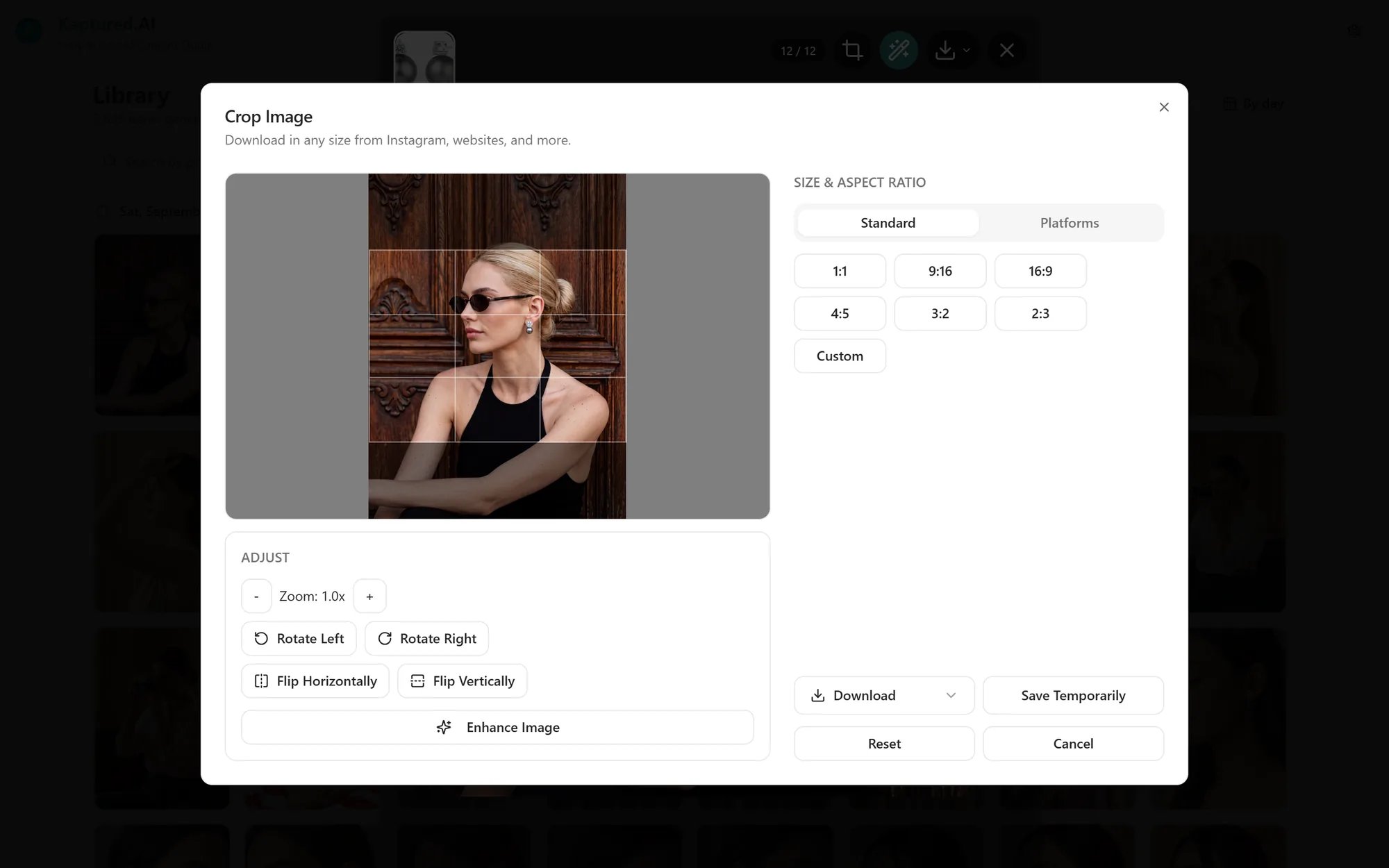
1. Open an image in the viewer and click **Crop image**.
2. Choose a shape:
* **Standard ratios:** **1:1**, **9:16**, **16:9**, **4:5**, **3:2**, **2:3**, or **Custom**.
* **Platform sizes:** pick a platform, then the image type you need. The crop box snaps to that exact size.
3. Drag the crop box to frame the product. Use **Adjust** to rotate or flip.
4. Fine-tune **Width** and **Height** if needed.
5. Click **Download**.
 ## Built-in platform sizes
| Platform | Sizes included |
| ---------------------- | ------------------------------------------------------------------------------------------------------------------------------- |
| **Amazon** | Minimum (1000 × 1000), Recommended (2560 × 2560) |
| **Amazon Standard A+** | 3 images with text, single left/right image, logo, image with overlay, image header with text |
| **Amazon Premium A+** | Comparison tables, images with text, video carousel, mobile and desktop background and full images |
| **eBay** | Minimum (500 × 500), Recommended (1600 × 1600) |
| **Etsy** | Listing thumbnail (2000 × 2000), shop banner (3360 × 840), listing images |
| **Shopify** | Product images (2048 × 2048), slideshows and banners (1200 to 2000 wide) |
| **Instagram** | Landscape (1080 × 566), Square (1080 × 1080), Portrait (1080 × 1350), Story/Reel (1080 × 1920) |
| **Facebook Ads** | Cover photo (820 × 312), page header (1200 × 628), single image ad (1080 × 1080) |
| **Google Display Ads** | Leaderboard (728 × 90), billboard (970 × 250), medium rectangle (300 × 250), half page (300 × 600), large rectangle (336 × 280) |
| **Website Banners** | Wide banners (1600 × 500, 1600 × 700), homepage hero (1920 × 1080), mobile hero (1080 × 1440) |
Generate at **2K** or **4K** if you'll crop tightly or need a large size such as Amazon's recommended 2560 × 2560. Cropping a 1K image down leaves fewer pixels to work with.
## Related articles
* [The Image Viewer and Download Options](/editing-and-video/viewer-and-downloads)
* [Final Settings and Image Engines](/ai-photo-studio/final-settings-and-image-engines)
* [Magic Edit](/editing-and-video/magic-edit)
## Built-in platform sizes
| Platform | Sizes included |
| ---------------------- | ------------------------------------------------------------------------------------------------------------------------------- |
| **Amazon** | Minimum (1000 × 1000), Recommended (2560 × 2560) |
| **Amazon Standard A+** | 3 images with text, single left/right image, logo, image with overlay, image header with text |
| **Amazon Premium A+** | Comparison tables, images with text, video carousel, mobile and desktop background and full images |
| **eBay** | Minimum (500 × 500), Recommended (1600 × 1600) |
| **Etsy** | Listing thumbnail (2000 × 2000), shop banner (3360 × 840), listing images |
| **Shopify** | Product images (2048 × 2048), slideshows and banners (1200 to 2000 wide) |
| **Instagram** | Landscape (1080 × 566), Square (1080 × 1080), Portrait (1080 × 1350), Story/Reel (1080 × 1920) |
| **Facebook Ads** | Cover photo (820 × 312), page header (1200 × 628), single image ad (1080 × 1080) |
| **Google Display Ads** | Leaderboard (728 × 90), billboard (970 × 250), medium rectangle (300 × 250), half page (300 × 600), large rectangle (336 × 280) |
| **Website Banners** | Wide banners (1600 × 500, 1600 × 700), homepage hero (1920 × 1080), mobile hero (1080 × 1440) |
Generate at **2K** or **4K** if you'll crop tightly or need a large size such as Amazon's recommended 2560 × 2560. Cropping a 1K image down leaves fewer pixels to work with.
## Related articles
* [The Image Viewer and Download Options](/editing-and-video/viewer-and-downloads)
* [Final Settings and Image Engines](/ai-photo-studio/final-settings-and-image-engines)
* [Magic Edit](/editing-and-video/magic-edit)