> ## Documentation Index
> Fetch the complete documentation index at: https://docs.kaptured.ai/llms.txt
> Use this file to discover all available pages before exploring further.
# Final Settings and Image Engines
> Focus, lens look, aspect ratio, and how the v1, v2 and v3 image engines differ in quality and credits.
**Final Settings** is the last step before you generate. It sets the camera look, the shape of the image, and which image engine makes it. The engine and resolution you pick set the credit cost.
 ## Focus
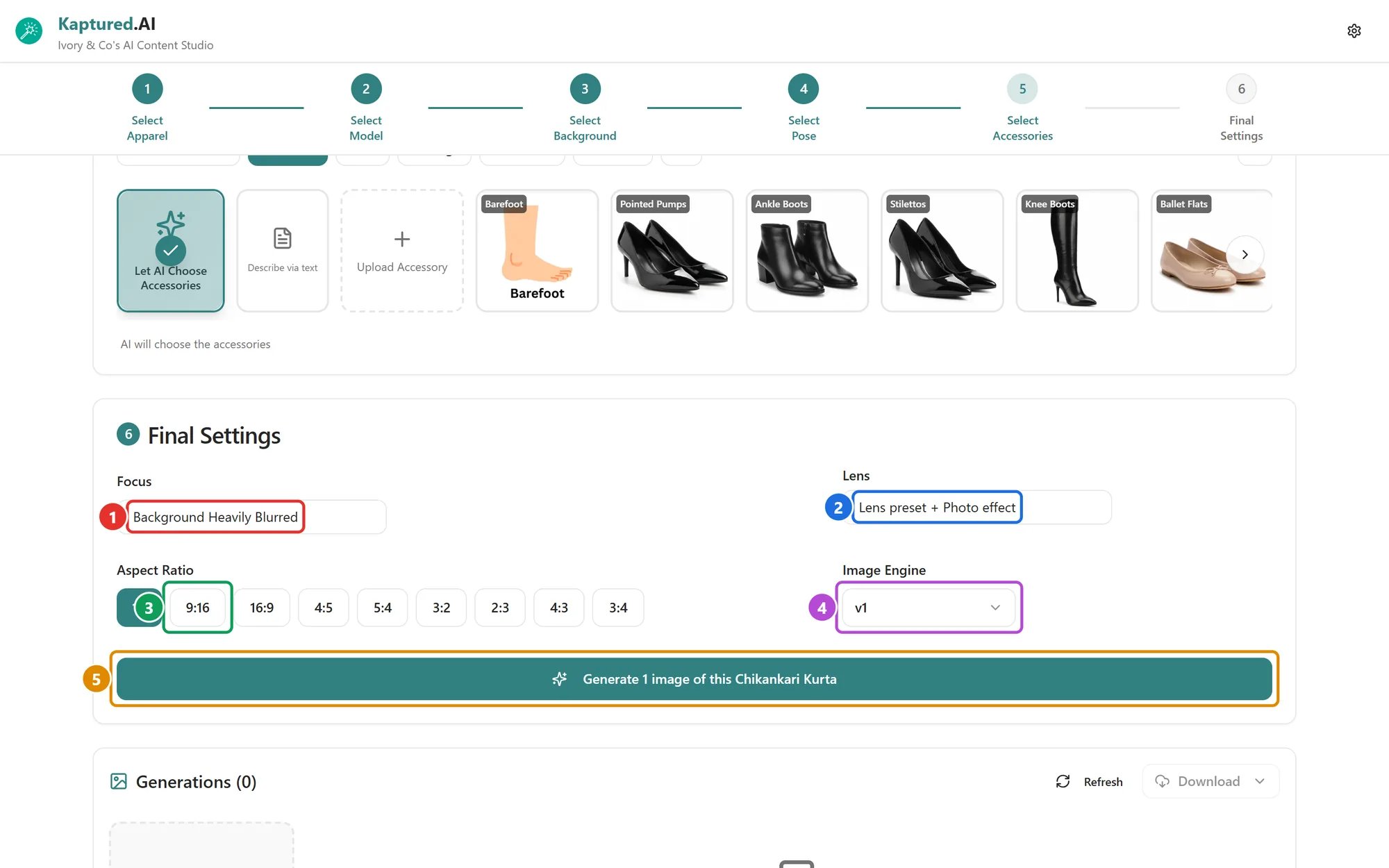
Open the **Focus** menu (1):
* **Background Heavily Blurred** (default): the product and model stand out.
* **Strong Background Bokeh**: soft, round light spots in the background.
* **No Hair on Clothes**: keeps the model's hair off the garment so the product stays fully visible.
## Lens
Open the **Lens** menu (2):
* **Lens Preset:** for clothing, **Outdoor**, **Full Body**, **Studio** or **Creative**. For jewelry, **Best Overall**, **Luxury Look**, **Ecommerce** or **Jewelry on Model**.
* **Photo Effect:** a color and light style, such as **Clean E-Commerce Studio Look**, **Fashion Editorial Portra Look**, **Golden Hour Portrait**, **Sunset Backlight with Lens Flare** or **Fuji Classic Chrome Aesthetic**.
## Aspect ratio
Pick a shape (3): **1:1**, **9:16**, **16:9**, **4:5**, **5:4**, **3:2**, **2:3**, **4:3** or **3:4**. The studio remembers the last one you used.
| Use | Pick |
| ------------------------------------ | ---------- |
| Marketplace listings, Instagram feed | 1:1 or 4:5 |
| Stories, Reels, Shorts | 9:16 |
| Website banners | 16:9 |
The Free plan is limited to 1:1.
## Image engines
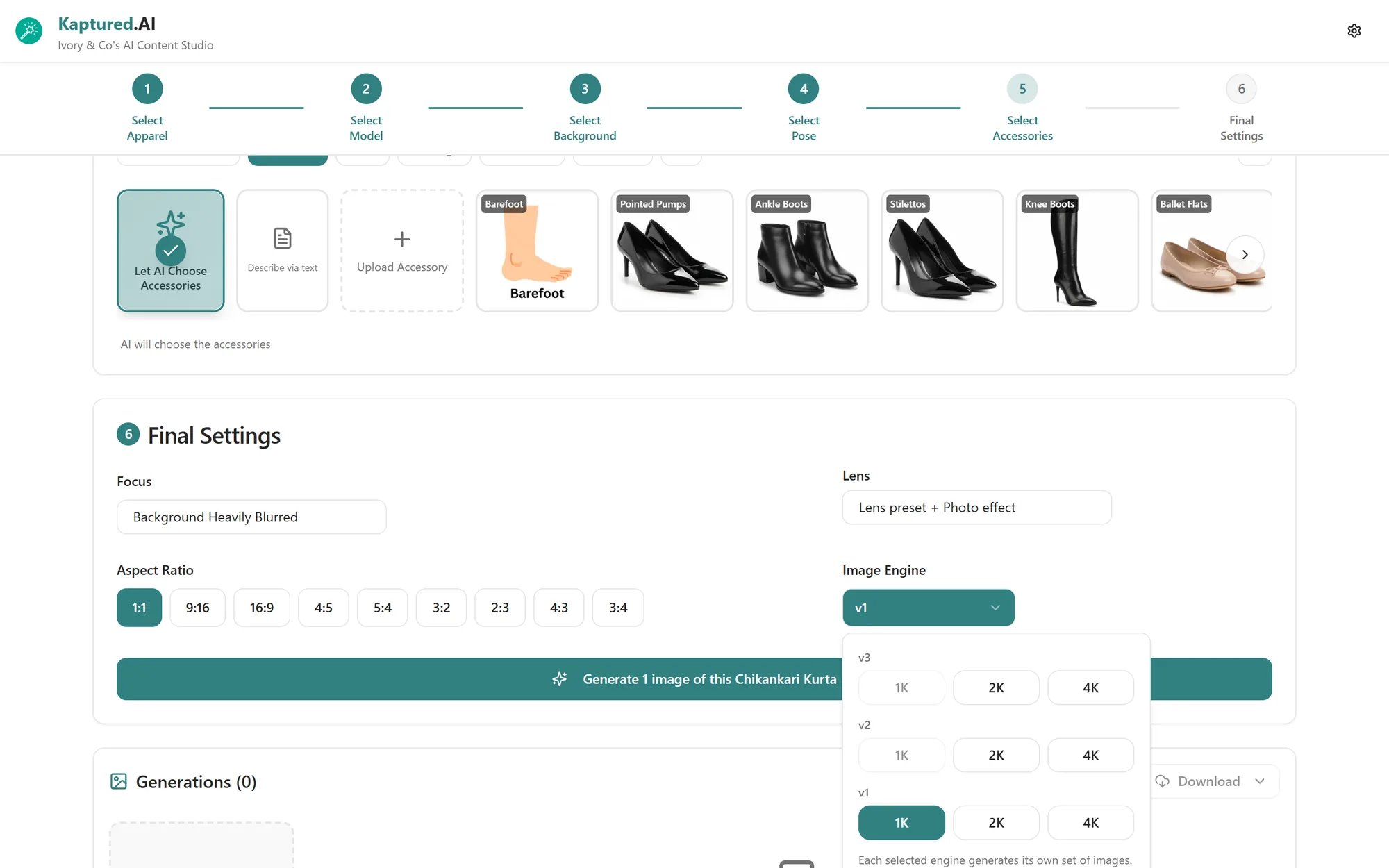
The **Image Engine** menu (4) lets you pick one or more engines, each at **1K**, **2K** or **4K**. **Each engine you select makes its own image**, so selecting two gives you two images to compare, and costs the sum of both. The generate button (5) updates to show how many images you'll get.
## Focus
Open the **Focus** menu (1):
* **Background Heavily Blurred** (default): the product and model stand out.
* **Strong Background Bokeh**: soft, round light spots in the background.
* **No Hair on Clothes**: keeps the model's hair off the garment so the product stays fully visible.
## Lens
Open the **Lens** menu (2):
* **Lens Preset:** for clothing, **Outdoor**, **Full Body**, **Studio** or **Creative**. For jewelry, **Best Overall**, **Luxury Look**, **Ecommerce** or **Jewelry on Model**.
* **Photo Effect:** a color and light style, such as **Clean E-Commerce Studio Look**, **Fashion Editorial Portra Look**, **Golden Hour Portrait**, **Sunset Backlight with Lens Flare** or **Fuji Classic Chrome Aesthetic**.
## Aspect ratio
Pick a shape (3): **1:1**, **9:16**, **16:9**, **4:5**, **5:4**, **3:2**, **2:3**, **4:3** or **3:4**. The studio remembers the last one you used.
| Use | Pick |
| ------------------------------------ | ---------- |
| Marketplace listings, Instagram feed | 1:1 or 4:5 |
| Stories, Reels, Shorts | 9:16 |
| Website banners | 16:9 |
The Free plan is limited to 1:1.
## Image engines
The **Image Engine** menu (4) lets you pick one or more engines, each at **1K**, **2K** or **4K**. **Each engine you select makes its own image**, so selecting two gives you two images to compare, and costs the sum of both. The generate button (5) updates to show how many images you'll get.
 | Engine | Best for | 1K | 2K | 4K |
| ------------------------------------- | ------------------------------------------- | -- | -- | -- |
| **v1** (Best Value, Standard quality) | Everyday catalog images, testing ideas | 12 | 20 | 35 |
| **v2** (Most Powerful, Pro quality) | Hero shots, fine details, jewelry close-ups | 40 | 50 | 90 |
| **v3** (Most Powerful, Pro quality) | Hero shots, a different look from v2 | 40 | 50 | 90 |
*Credits per image. Your account may have different rates; the confirm dialog always shows the exact cost.*
Try an idea on **v1 at 1K** first. When you like the direction, generate the final on v2 or v3 at a higher resolution.
* Which engines appear depends on what's allowed in [Shop Settings → Image engines](/getting-started/platform-overview/shop-settings#image-engines). If you see "This image engine is not enabled for your shop", turn it on there.
* The Free plan includes **v1** only.
## Your own API key
If you've added your own Google Gemini key under **API Keys**, you see **Your own Gemini API key in use**. See [Bring Your Own Key](/account-and-security/bring-your-own-key).
## Related articles
* [How Credits Work](/subscription-and-billing/credits-explained)
* [Shop Settings](/getting-started/platform-overview/shop-settings)
* [Your First Photoshoot](/ai-photo-studio/your-first-photoshoot)
| Engine | Best for | 1K | 2K | 4K |
| ------------------------------------- | ------------------------------------------- | -- | -- | -- |
| **v1** (Best Value, Standard quality) | Everyday catalog images, testing ideas | 12 | 20 | 35 |
| **v2** (Most Powerful, Pro quality) | Hero shots, fine details, jewelry close-ups | 40 | 50 | 90 |
| **v3** (Most Powerful, Pro quality) | Hero shots, a different look from v2 | 40 | 50 | 90 |
*Credits per image. Your account may have different rates; the confirm dialog always shows the exact cost.*
Try an idea on **v1 at 1K** first. When you like the direction, generate the final on v2 or v3 at a higher resolution.
* Which engines appear depends on what's allowed in [Shop Settings → Image engines](/getting-started/platform-overview/shop-settings#image-engines). If you see "This image engine is not enabled for your shop", turn it on there.
* The Free plan includes **v1** only.
## Your own API key
If you've added your own Google Gemini key under **API Keys**, you see **Your own Gemini API key in use**. See [Bring Your Own Key](/account-and-security/bring-your-own-key).
## Related articles
* [How Credits Work](/subscription-and-billing/credits-explained)
* [Shop Settings](/getting-started/platform-overview/shop-settings)
* [Your First Photoshoot](/ai-photo-studio/your-first-photoshoot)