> ## Documentation Index
> Fetch the complete documentation index at: https://docs.kaptured.ai/llms.txt
> Use this file to discover all available pages before exploring further.
# Choosing a Model: Library Faces, Your Own Faces and Face Styling
> Pick a face from the model library, upload your own model, and adjust age, hair and makeup.
The **Select Model** step decides who wears your product. You can pick from our library, let the AI choose, or use your own model's face.
 ## Pick from the model library
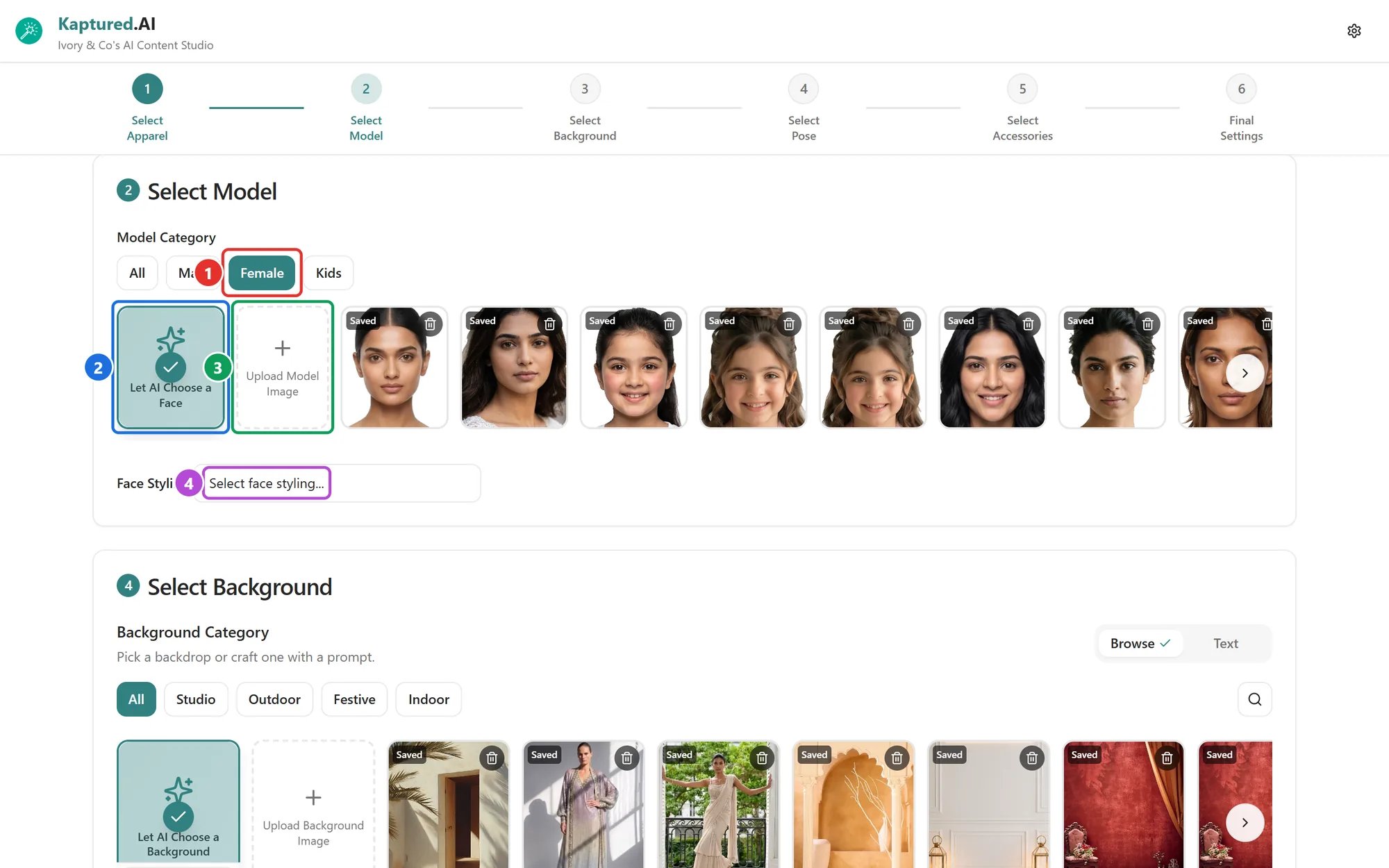
Filter by **All**, **Male**, **Female** or **Kids** (1), then click a face. The library has 27 male, 30 female and 20 kids' faces.
**Let AI Choose a Face** (2) picks a suitable face for the product for you.
## Upload your own model
Available on paid plans.
1. Click **Upload Model Image** (3) and choose a photo.
2. In **Crop Face for Better Results**, crop to the face only:
* Crop just the face: no clothes or shoulders.
* Use a straight, front-facing photo.
3. Tick **Save for later** to keep this face for future shoots.
4. Click **Confirm Crop**.
Saved faces appear in the model list with a **Saved** tag. You can keep up to **10** saved faces. The photo must be under 3 MB after we optimize it.
If you see "Couldn't detect a clear face, adding anyway", the face is still used, but results are better with a clear, front-facing photo.
Only upload photos of people who have agreed to have their likeness used.
## Face Styling
Open **Face Styling** (4) to fine-tune the model:
* **Age:** Young (18 to 25), Middle-aged (26 to 35), Mature (36 to 50) or Senior (50 plus). For kids: Baby, Toddler, Child or Teen.
* **Face Realism**
* **Beard** (male models)
* **Hairstyle**
* **Makeup**
## Jewelry: no model
Jewelry shops can choose **No Model, Product-only** for a shot of the piece on its own. Some jewelry templates don't include a model face at all; the studio tells you if so.
## Group shots
In a [Multi Product Shoot](/ai-photo-studio/group-shots), the model must be **Let AI Choose**. Custom faces aren't allowed in group shots.
## Related articles
* [Your First Photoshoot](/ai-photo-studio/your-first-photoshoot)
* [Backgrounds and Poses](/ai-photo-studio/backgrounds-and-poses)
* [Styling Customers with Virtual Try-On](/customers/styling-customers)
## Pick from the model library
Filter by **All**, **Male**, **Female** or **Kids** (1), then click a face. The library has 27 male, 30 female and 20 kids' faces.
**Let AI Choose a Face** (2) picks a suitable face for the product for you.
## Upload your own model
Available on paid plans.
1. Click **Upload Model Image** (3) and choose a photo.
2. In **Crop Face for Better Results**, crop to the face only:
* Crop just the face: no clothes or shoulders.
* Use a straight, front-facing photo.
3. Tick **Save for later** to keep this face for future shoots.
4. Click **Confirm Crop**.
Saved faces appear in the model list with a **Saved** tag. You can keep up to **10** saved faces. The photo must be under 3 MB after we optimize it.
If you see "Couldn't detect a clear face, adding anyway", the face is still used, but results are better with a clear, front-facing photo.
Only upload photos of people who have agreed to have their likeness used.
## Face Styling
Open **Face Styling** (4) to fine-tune the model:
* **Age:** Young (18 to 25), Middle-aged (26 to 35), Mature (36 to 50) or Senior (50 plus). For kids: Baby, Toddler, Child or Teen.
* **Face Realism**
* **Beard** (male models)
* **Hairstyle**
* **Makeup**
## Jewelry: no model
Jewelry shops can choose **No Model, Product-only** for a shot of the piece on its own. Some jewelry templates don't include a model face at all; the studio tells you if so.
## Group shots
In a [Multi Product Shoot](/ai-photo-studio/group-shots), the model must be **Let AI Choose**. Custom faces aren't allowed in group shots.
## Related articles
* [Your First Photoshoot](/ai-photo-studio/your-first-photoshoot)
* [Backgrounds and Poses](/ai-photo-studio/backgrounds-and-poses)
* [Styling Customers with Virtual Try-On](/customers/styling-customers)